CrystalDiskMark verwenden
Diese Seite führt Sie durch Installation, ersten Benchmark und Hauptfenster sowie Menüs. Folgen Sie den Abschnitten der Reihe nach, wenn Sie das Programm noch nicht kennen.
Installation
Sie können die ZIP- (portabel) oder Installer-Version nutzen. Beide gibt es auf der Download-Seite.
- ZIP: Unzip the file to any folder. To update, unzip over the previous installation. No installer runs; just open the executable from the folder.
- Installer: Run the installer and follow the steps. To uninstall, go to Settings → Apps (or Add or Remove Programs) and remove CrystalDiskMark.
Benchmark starten
- Wählen Sie Anzahl der Testläufe (1–9; Standard in v9 ist 5).
- Wählen Sie Testgröße (z. B. 16MiB … 64GiB; Standard 1GiB). Für langsame/USB-Laufwerke kleinere Größen.
- Wählen Sie Testlaufwerk (C:\, D:\, usw.). Für Netzlaufwerke CrystalDiskMark als Standardbenutzer ausführen (UAC: Nein).
- Klicken Sie auf Alle, um alle Tests auszuführen, oder auf eine spezifische Test-Schaltfläche.
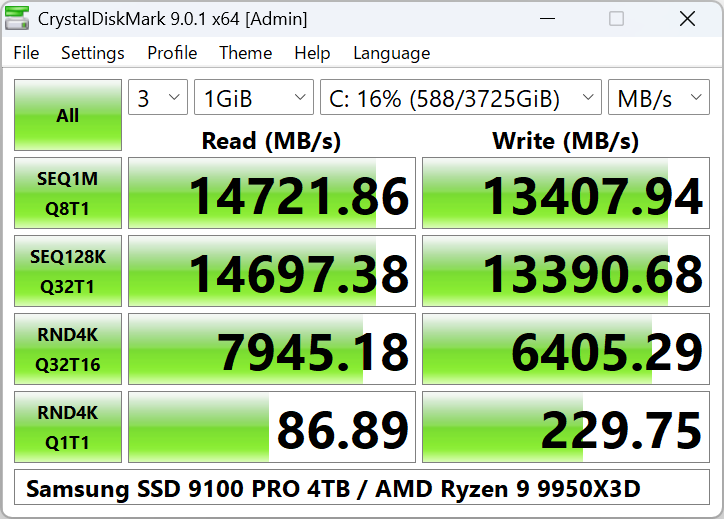
Hauptfenster: Screenshot im images-Ordner hinzufügen.
Hauptfenster-Optionen
- Anzahl der Tests: 1–9. Standard in v9 ist 3.
- Test Size: 16MiB, 32MiB, 64MiB, 128MiB, 256MiB, 512MiB, 1GiB, 2GiB, 4GiB, 8GiB, 16GiB, 32GiB, 64GiB.
- Test Drive: Any local or network drive (network requires no admin).
- Test Unit: MB/s, GB/s, IOPS, or μs (average latency).
Block size, queue, and thread settings are in Settings → Settings.
Menü Datei
- Copy — Copy benchmark result to clipboard.
- Save (text) — Save result as UTF-16LE text file.
- Save (image) — Save as PNG, JPEG, or BMP.
- Exit — Close the application.
Settings & Test Data
Test data: All 0x00 (0 Fill) or Random. On some SSDs, results can differ between the two.
Standard
- Random: 4KiB Q1T1, 4KiB Q32T1
- Sequential: 1MiB Q1T1, 1MiB Q8T1
NVMe SSD
- Random: 4KiB Q1T1, 4KiB Q32T16
- Sequential: 128KiB Q32T1, 1MiB Q8T1
Profiles
Profile menu: Standard, Spitzenleistung, Real World Performance, Demo. Standard edition also has [+Mix] variants (read/write mix).
Next Steps
- To interpret the numbers (SEQ, RND, IOPS), read Benchmark-Ergebnisse verstehen.
- Wenn ein Test fehlschlägt oder das Laufwerk fehlt: Fehlerbehebung und FAQ.